Super Battery Saver1.0
Publisher Description
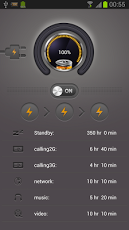
If you want to find a powerful,smart tool to reduce battery loss and prolong battery life with just one click,try Super Battery Saver RIGHT NOW! Super Battery Saver optimizes power consumption with just one click by managing some of the most consuming modules in Android Operating System such as background screen brightness,sounds, GPS, WIFI, Bluetooth, auto-sync/background data, and much more. Also, it indicates battery information in a nice user interface. Chosing Super Battery Saver, you NEVER have to suffer from poor battery performance again.Just have a try! It is free! ==Highlights==✓One-click-optimizer✓Intelligent battery saving mode✓Revolutionary UI design of main page==Main Features==✓Manages battery consuming modules by using one-tap battery widget.✓ Intelligently extends usage time with configured your own saving modes .✓Estimates remaining Idle, Calling, Browsing, Music, Video, and Gaming times.✓Shows battery consumption list of real-time running items in percent.✓Quick setup for Wi-Fi, Bluetooth, GPS, background light, sound mode, and synchroniza.*******************************If you like Super Battery Saver, please rate it 5-star. If you find an error or have any questions, write me an email. After installation, you must manually add the Super Battery Saver to the home screen.
About Super Battery Saver
The company that develops Super Battery Saver is QBXX DEV. The latest version released by its developer is 1.0. This app was rated by 1 users of our site and has an average rating of 4.0.
To install Super Battery Saver on your Android device, just click the green Continue To App button above to start the installation process. The app is listed on our website since 2013-06-28 and was downloaded 27 times. We have already checked if the download link is safe, however for your own protection we recommend that you scan the downloaded app with your antivirus. Your antivirus may detect the Super Battery Saver as malware as malware if the download link to com.qbxx.batterysave is broken.
How to install Super Battery Saver on your Android device:
- Click on the Continue To App button on our website. This will redirect you to Google Play.
- Once the Super Battery Saver is shown in the Google Play listing of your Android device, you can start its download and installation. Tap on the Install button located below the search bar and to the right of the app icon.
- A pop-up window with the permissions required by Super Battery Saver will be shown. Click on Accept to continue the process.
- Super Battery Saver will be downloaded onto your device, displaying a progress. Once the download completes, the installation will start and you'll get a notification after the installation is finished.
Program Details
System requirements
Download information
Pricing
Version History
version 1.0
posted on 2013-06-28
version 1.0
posted on 2013-06-28
Several fixes and updates
